Introduction: The New Frontier of E-commerce
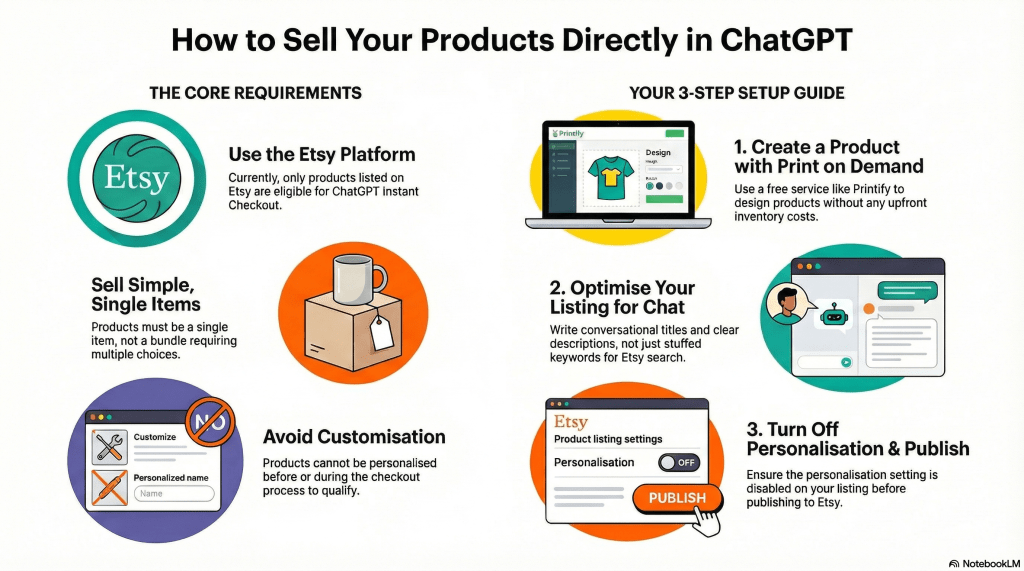
ChatGPT has just rolled out a revolutionary feature called “Instant Checkout,” transforming the conversational AI into an emerging conversational sales channel. This new capability allows users to purchase physical products instantly, right inside their personal chats, without ever leaving the ChatGPT app.
This development represents a monumental shift for online sellers. It means your products are no longer just listed on a marketplace; they can be actively recommended in a conversation. This shifts the customer journey from actively searching on a marketplace to passively receiving a perfect recommendation in a natural conversation. The scale of this opportunity is massive:
“your products can now be recommended to the 190 million people who chat with ChatGPT every single day.”
This guide provides a complete, step-by-step walkthrough for any aspiring entrepreneur to create and list a product specifically designed for ChatGPT Instant Checkout, even without any startup costs. Before we build our product, let’s understand the essential rules of this new marketplace.
This guide is based on the comprehensive video tutorial by “Make Money with Stacy La,” who also offers a detailed companion checklist on her channel.

——————————————————————————–
1. Understanding the Foundational Rules
To get your products featured, you must adhere to a specific set of non-negotiable requirements set by OpenAI. These rules dictate the platform you must use and the type of products that are eligible.
1.1. The Exclusive Platform: Etsy
For now, OpenAI is working with only one marketplace for the Instant Checkout feature. While other platforms like Shopify may be added in the future, the current and only eligible platform is Etsy. If you want to be one of the first to capitalize on this new traffic source, you need to be selling on Etsy.
1.2. The Two Critical Product Requirements
ChatGPT is very specific about the products it will recommend with a “buy” button. Your listing must meet two primary criteria to be eligible.
| Rule | What This Means for Your Product |
| Must Be a Single Item | Your listing must be for one specific item, not a bundle or a pack where the customer has to make multiple selections. For example, a listing for a ‘T-Shirt’ that requires the customer to select a size and color before purchase would be ineligible. The listing must be for one specific variant, such as a ‘Medium Red T-Shirt.’ |
| Cannot Be Customized | Your product cannot require any personalization or customization from the customer before or during the checkout process. A pre-designed greeting card is eligible, but a card that requires the customer to add a name or message is not. |
Now that we know the rules, let’s walk through how to create a compliant product for free, without needing any inventory.
——————————————————————————–
2. The Creation Engine: Using Printify for Print-on-Demand
You don’t need to have a warehouse full of products to get started. Using a model called print-on-demand, you can design and sell physical goods without any upfront costs.
2.1. What is Print-on-Demand (POD)?
Print-on-demand is a business model where you customize and sell physical products online without ever buying inventory. Using a free platform like Printify, you simply create a design, apply it to a product in their catalog (like a mug, t-shirt, or candle), and list it in your Etsy shop. When a customer places an order, Printify handles the production and shipping directly to them.
This approach is ideal for beginners because, once your product is designed and listed, your business becomes “completely hands-off and completely automated.”

2.2. Step-by-Step: Creating Your First Product
Here is the exact process for creating your first eligible product using Printify.
- Create a free Printify account.
- Select a product from the catalog that fits the Instant Checkout criteria. The examples of a single candle or a greeting card are excellent starting points.
- Click “Start Designing” to open the product editor.
- Add your design by uploading a unique image or adding creative text. This is where you create the product that customers will see.
- WARNING: This is a non-negotiable rule. Many popular Etsy strategies rely on personalization. For ChatGPT Instant Checkout, this approach will make your product invisible. You must ensure all personalization options are disabled.
- Preview the mockups to see a realistic preview of how the final product will look when it reaches your customer.
- Click “Save product” to proceed to the final listing details page.
With your product designed, we’ve reached the most important part of the process: optimizing your listing to be found within a conversation.
——————————————————————————–
3. The Optimization Advantage: Preparing Your Listing for ChatGPT
How you write your product details can be the difference between your product being recommended by ChatGPT or never being seen at all. The optimization strategy for conversational AI is fundamentally different from traditional e-commerce search.
3.1. Why Standard Etsy Optimization Fails
On Etsy, sellers often use a tactic called “keyword stuffing,” where they cram as many short keywords as possible into a product title to rank in search results. Tools like Printify even offer an AI writer that generates titles and descriptions for you. While this AI is “set up perfectly for Etsy,” its output is not great for ChatGPT Instant Checkout because it relies on this outdated keyword-stuffing model.
This strategy is ineffective for ChatGPT, which prioritizes natural, conversational language. You must manually override any AI-generated text and rewrite it to think less like a search engine and more like a person asking for a recommendation.
3.2. Your ChatGPT Optimization Checklist
Follow this checklist to ensure every part of your listing is optimized for conversational discovery.
- Product Title:
- Action: Rewrite the title to be conversational and descriptive.
- Insight: The goal is to use phrases a real person would use when asking ChatGPT for a product. You are no longer writing for a keyword-matching algorithm; you are writing for an AI that is trying to match your product to a user’s natural-language request. Instead of an Etsy-optimized title like “Housewarming Gift, Scented Candle, Soy Wax, Gift for Friend,” a ChatGPT-optimized title would be more like “A Popular Scented Candle for a Housewarming Gift.” The difference is subtle but crucial.
- Product Description:
- Action: Write a description that is extremely clear about the product’s contents, materials, and size. Be precise and leave no room for ambiguity.
- Tags:
- Action: Add relevant tags.
- Insight: Tags “don’t matter at the moment for ChatGPT ranking, but it will help on Etsy.” It’s good practice to include them for visibility on the Etsy marketplace itself.
- Personalization:
- Action: Ensure this setting is turned OFF. This is a mandatory requirement.
- Shipping:
- Action: Leave this set to “automatically assigned” by Printify. The platform handles all the shipping logistics for you.
- Pricing & Variants:
- Action: List only one variant/option. Multiple options (like different sizes or colors in the same listing) violate the “single item” rule.
- Insight: You must price your product to ensure you make a profit. With print-on-demand, Printify takes a cut of the final sale price to cover the cost of the physical product and production. The remaining amount is your profit.
- Variant Visibility:
- Action: Ensure this option is selected.
- Insight: This setting ensures that your listing “only shows available products,” which is a best practice for a clean customer experience.
Once your listing is perfectly optimized, you’re ready to launch.

4. Launch and Look Ahead
With your product created and your listing optimized, the final steps are straightforward, but it’s important to have the right expectations.
4.1. Publishing Your Product
The final step is to click the “Publish” button in Printify. This action automatically sends your completed and optimized listing directly to your connected Etsy shop, making it available for purchase.
4.2. Important Considerations for Success
Keep these key points in mind as you begin your journey with ChatGPT Instant Checkout:
- Indexing Time: It is currently unknown how long it will take for a new product to be indexed and recommended by ChatGPT. Success depends on how well you optimize your listings and follow OpenAI’s guidelines.
- Current Limitations: Instant Checkout is currently available only for U.S. sellers and U.S. buyers. However, it is wise to set up your products now so that you are ready and ahead of the competition when the feature expands globally.
- Traffic Diversification: Do not rely solely on ChatGPT for sales. Continue to promote your products through other channels like social media, with a particular focus on visual platforms like Pinterest, to build a resilient business.
- Seller Fees: There is no extra cost for a customer to use Instant Checkout, but sellers are charged a small transaction fee for sales made through this feature. Be sure to factor this into your pricing strategy.
By following these steps, you’re not just listing a product; you’re positioning yourself at the forefront of a major shift in online shopping.
——————————————————————————–
5. Conclusion: Your First-Mover Advantage
The integration of e-commerce into conversational AI is just beginning. While the Instant Checkout feature is new and not yet perfect, it represents the new paradigm of conversational commerce. By learning this new traffic strategy now, you are putting yourself “100 steps ahead of everyone else” and, more importantly, 100 steps ahead of your competitors. Embrace this opportunity to be a pioneer in the next generation of e-commerce.




Leave a comment